Dec 27, 2023
Web Apps vs Native Mobile Apps vs Hybrid Apps

Cara Suarez
Read More

Then the bug reports start appearing. A feature fails on a specific device model. Push notifications stop working for some users. The user interface breaks on a phone your team never tested.
Situations like this are surprisingly common in mobile development. Applications that perform well in controlled environments can fail when exposed to the diversity of real-world devices, operating systems, and network conditions.
Understanding why these failures occur is the first step toward preventing them and improving application reliability.
This article is part of a broader series exploring key challenges in mobile app testing strategy and reliability.
One of the most common causes of production issues is mobile device fragmentation. Mobile devices differ significantly in hardware, operating systems, and manufacturer customizations.
Two users running the same application may experience completely different behaviors depending on their device configurations.
This can result in layouts breaking on different screen sizes, manufacturer-specific operating system behavior changes, and features behaving inconsistently due to hardware differences.
Without testing across multiple devices, these issues often remain undetected until they impact end users.
Mobile applications are often tested in stable environments such as office Wi-Fi or controlled lab networks. However, real users operate under far less predictable network conditions.
In real-world scenarios, users may experience intermittent connectivity, weak signal strength, or sudden transitions between Wi-Fi and cellular networks.
Common challenges include high latency, unstable connections, switching between networks, and poor signal quality.
An API request that works reliably in a stable environment may fail or time out when exposed to these real-world conditions.
Many mobile features depend directly on physical hardware components. While simulators and emulators can approximate these behaviors, they cannot fully replicate real device performance.
Examples include camera functionality, biometric authentication, GPS and location services, and device sensors.
A feature that works correctly in a simulated environment may behave differently on devices with varying hardware specifications or permission settings.
Biometric systems and motion-based features may also behave inconsistently across devices due to differences in hardware implementation.
Background process behavior is another major cause of production issues, especially on Android devices.
Some device manufacturers limit background activity to conserve battery life, which can impact how applications function.
This can lead to delayed push notifications, background tasks being terminated, and interruptions in location updates.
An application that works correctly during testing may behave differently on devices where background processes are restricted.
Many teams rely heavily on emulators and simulators during development because they are fast and convenient. However, virtual environments cannot fully replicate real device conditions.
Common gaps include limited device coverage, insufficient access to physical devices, and overly ideal testing environments.
Testing environments are often optimized for stability and performance, which does not reflect the unpredictable conditions experienced by real users.
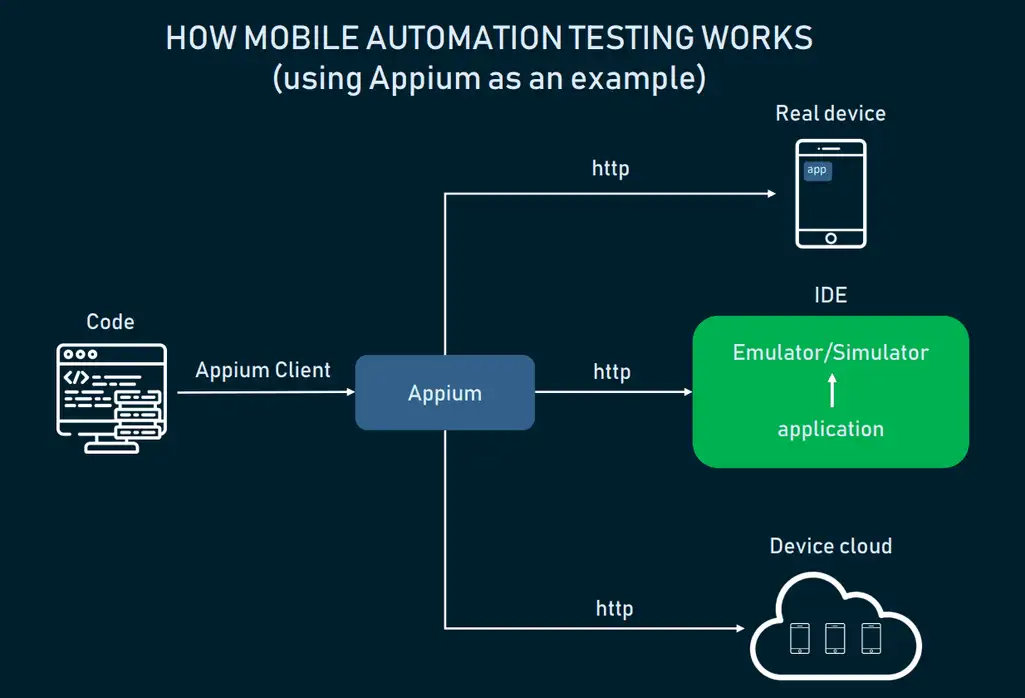
An effective testing strategy combines both emulators and real devices rather than relying on one approach alone.
Emulators provide speed and efficiency during development, while real devices offer accurate validation of real-world behavior.
A balanced strategy includes using emulators for rapid development, testing across multiple device models, validating behavior across operating system versions, simulating real network conditions, and automating regression testing.
These combined approaches help teams identify issues earlier and better understand how applications perform in real-world environments.
Automated regression testing also enables teams to compare new builds against previous versions across different devices and platforms.
As mobile ecosystems grow more complex, testing across multiple devices becomes increasingly difficult to manage manually.
Device labs provide access to a wide range of physical devices without the need to maintain hardware internally.
Platforms such as Kobiton offer access to real devices alongside virtual environments, allowing developers to validate application behavior across different hardware and operating system combinations.
Flexible deployment models also enable teams to choose solutions that align with their development workflows.
Mobile applications rarely fail in production due to a single issue. Instead, failures often occur when applications encounter real-world conditions that were not fully tested.
Factors such as device fragmentation, network variability, hardware differences, and background process behavior can all impact performance after release.
By implementing a testing strategy that combines emulator efficiency with real-device validation, teams can identify issues earlier and deliver more reliable mobile experiences.